Data Breach Alert: Updates on The PNP Logistics System Data Breach Incident; Data of 390,000 Police Officers Allegedly Leaked
May 17, 2024
The Philippine National Police (PNP) Logistics Data Information and Management System (LDIMS) was allegedly hit by a cybersecurity incident on May 13, 2024, causing disruptions in the platform and having confidential data of nearly 390,000 police officers leaked to the public.
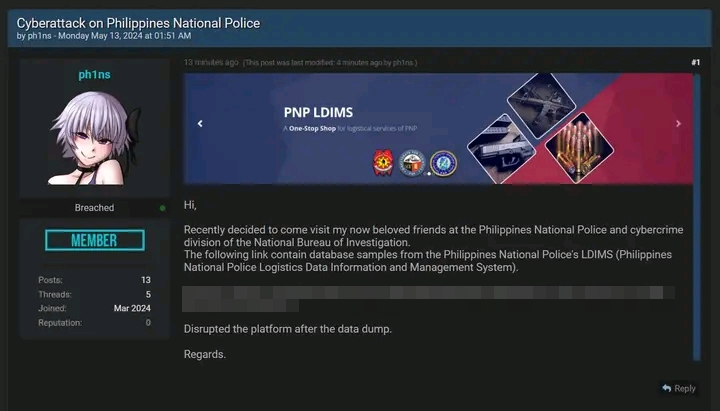
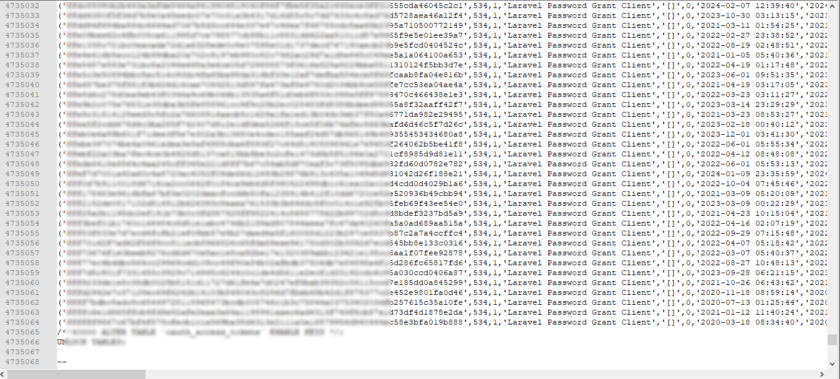
According to initial investigations from cybersecurity enthusiast group Deep Web Konek, the incident was done by a threat actor by the name of “ph1ns” who allegedly leaked on breachforums a 1.75GB Structured Query Language (SQL) file (later compressed to 275 MD) containing information on 390,000 police officers such as:
- Current and former police officers
- Police names and ranks
- Contact numbers
- Email addresses
- Records of issued guns
- Individuals linked to the PNP
Further investigations revealed that around 178,000 Gmail accounts, 58,000 Yahoo emails, and 19,000 PNP emails were among the compromised data.

PNP Response
According to PNP Spokesperson Col. Jean Fajardo, reports of the data leak surfaced at around 10am, May 13, 2024. In response, the PNP’s Information Technology (IT) officer immediately shut down the system to prevent further complications. PNP Spokesperson Fajardo notes that the system currently remains shut down with the PNP Anti Cybercrime Group (ACG) conducting their further investigations. Fajardo adds that current investigations have yet to determine the exact extent of the breach.
“We cannot say at this time because our IT (information technology) experts are extracting information from the server logs and are conducting digital forensics to determine the possible origin,”
Jean Fajardo, PNP Spokesperson
Spokesperson Fajardo adds that the affected system includes the vital information of the PNP’s logistical resources and assets.
“When we talk of logistics data information, we expect logistical resources of the PNP will somehow be included in that data so we really have to check if there was indeed a breach. Definitely, there are information data in the system because when we talk of logistics, it encompasses the logistical assets of the PNP,”
Jean Fajardo, PNP Spokesperson
In wake of the recent cybersecurity incident, PNP Chief General Rommel Francisco Marbil has given the directive to all PNP departments to strengthen their cybersecurity measures.
“The PNP chief (Gen. Rommel Francisco Marbil) has given a directive not only to the Directorate for Logistics but for all PNP units that maintain a database and other systems. We know that PNP is maintaining a lot of data system and many of these are vulnerable to attacks,”
Threat Actor: ph1ns
The threat actor known as “ph1ns” was involved in numerous cybersecurity incidents involving data breaches on several Philippine government websites and businesses, including the recent Department of Science and Technology (DOST) breach, the defacement of websites linked to House Speaker Romualdez, and the Acer Philippines HR data breach.
Recommendations
With the rising cases of data breaches in the Philippines, threat actors likely already have access to sensitive information of individuals and organizations such as names, addresses, credit cards, and bank account details. PSA emphasizes the dangers of data breaches, as threat actors who have access to your information can use this as leverage to sound more convincing in their “phishing” attempts.
At the individual or employee level, PSA suggests considering the following recommendations to minimize your exposure to potential bank or other online-related financial cyber scams:
- Understand how potentially serious it is to have your phone, laptop, or any device stolen or hacked if you use them to access financial accounts. Make sure you can remotely delete your phone or at least reset your financial account passwords if your phone is stolen.
- Don’t click on any links allegedly from your bank. Instead, go directly to your bank’s website through a search engine or through the bank’s app. Make sure to click the legitimate and official website since in some instances, victims also fall for phishing links and fake sites that were designed to look like the bank’s official website.
- If receiving a call from your bank regarding an allegedly compromised account, consider hanging up and calling the bank directly to verify that it is a legitimate security alert.
- If receiving a call from a bank or any person claiming to be from an organization, take note that threat actors may have information on you such as your name, phone number or address. They will use this information to sound “legitimate”.
- Never share your one-time pin with anyone. If you start receiving One Time Pin SMS messages from your bank that you did not request, contact your bank, and notify them your account may have been compromised. Your bank won’t ask for your one-time PIN.
- If you suspect your bank account has been compromised or involved in a data breach, monitor your bank accounts for any unauthorized transactions.
- For those using online banking apps, make sure that you have downloaded your application from a legitimate app store.
- Make purchases online from reputable sellers and secure your payment methods. Some online scam incidents involve customers being overcharged through multiple payment methods.
- Use a well-respected password manager to store strong and unique passwords. Good password managers make it easy to create and store unique passwords in a secure fashion.
- Social media pages like Facebook offer verified badges to indicate legitimacy. Make sure to check for such badges before conducting any business or transaction, especially from well-known companies. Alternatively, proceed with caution when using Facebook to make any sort of transaction.
- Be aware of fake websites that may appear real. These often use the same logo, colors, and layout to appear genuine. Oftentimes, these websites have spelling mistakes as well as an unusual URL.